Here’s the issue.
I have a WD 4TB MyCloud Personal cloud.
Part no WDBCTL0040HWT-10
Running OS 5.
Everything works great.
I have a question about something that has bothered me for some time and I was wondering if I could ask for a little clarification.
I have a USB hub plugged into the rear of my My Cloud device.
I then have 2 USB attached WD external storage devices plugged into the hub.
Now, when I go to create a share for one of the attached USB devices, how do I tell the My Cloud device, which of the two USB attached external storage device should be associated with the share I am creating ?
At first I thought that the share name that I assign, need to be equal to the model number of the device.
But that dosen’t seem to be the case.
Here’s why I say that.
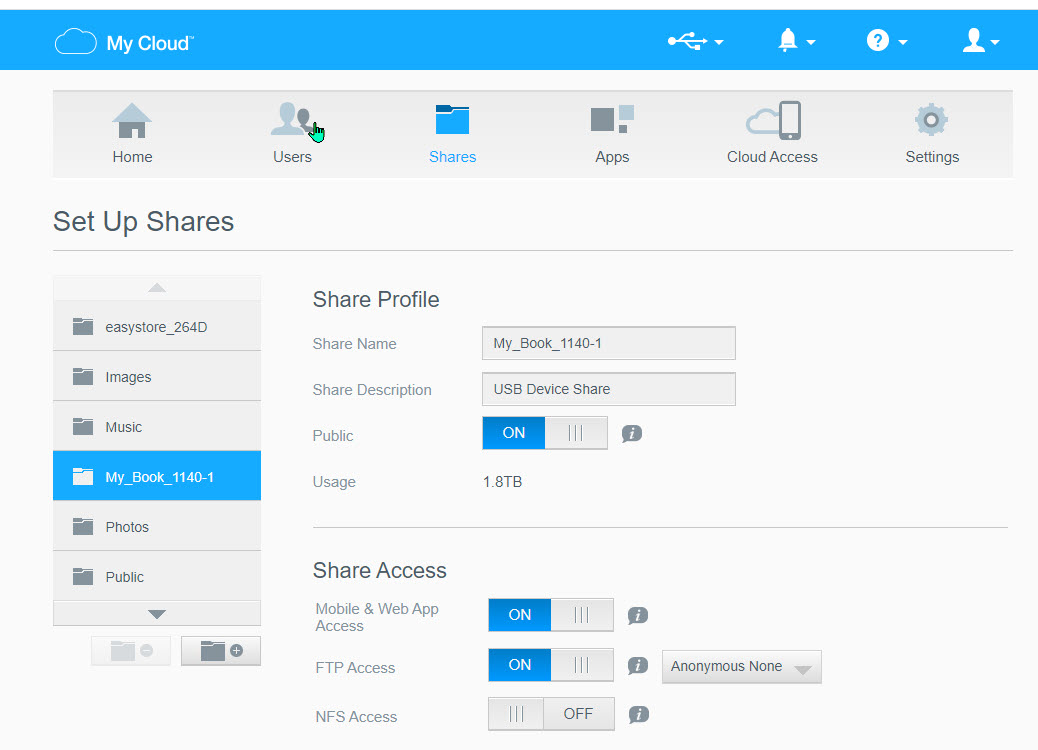
Here are my 2 USB attached devices as the My Cloud sees them.
Thanks for the reply, much appreciated.
As it turns out I HAVE read that chapter and it doesn’t really address my question.
I understand how to attach external USB drives to the My Cloud device.
And I know how to access them by mapping a drive letter from my WIndows laptop.
And it all works.
The following is NOT in the linked document. (At least I don’t think it is.)
What I have recently learned from watching YouTube videos is that the My Cloud device will automatically create a share for the externally attached USB device as soon as it is attached.
(I didn’t know that. I THOUGHT I would need to create a share for it.).
But my confusion arises when I try to understand what the My Cloud device is using for a link to the USB device.
It appears as if I can change the name of the USB share and well as the description of the USB share and the share continues to function.
I can detach the USB drive and reattach it to the My Cloud and it comes back “on line” using my modified share name and description.
So, the My Cloud must be using some other attribute of the externally attached USB drive as a Link.
(It doesn’t seem to care what I name it or how I describe it.)
And it is this link that I was trying to find out about.
Thanks again for taking the time to read and reply to my post.
The USB Share created in the My Cloud Dashboard comes from the Volume Name of the USB drive.
If you connect the USB drive to Windows, you can access the Volume Name of the USB drive.