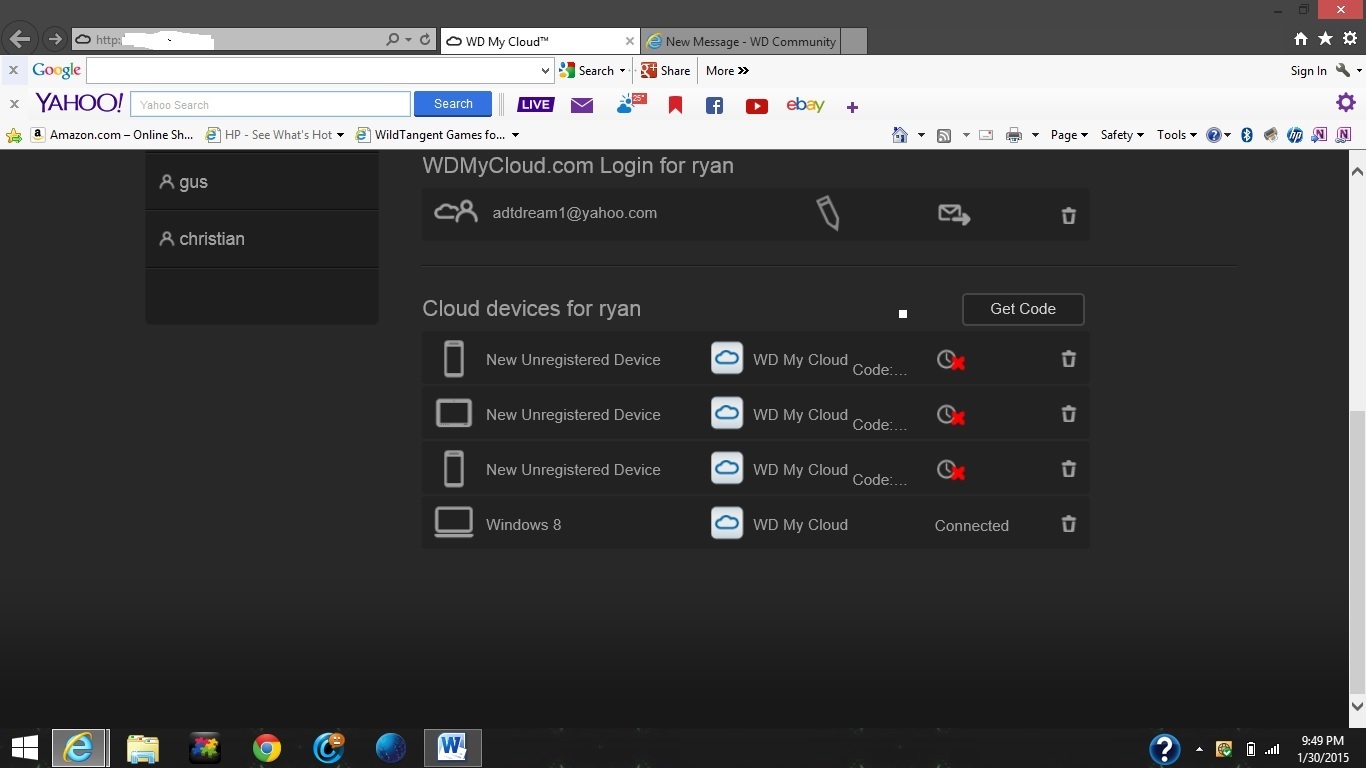
Thank you all for your help just a few more issues im working out. I have tried to connect my tablet and my android phone both ways by code and manualy and I get a red X with a clock icon. I have attached a pic of the problem im experiencing
is there a way to expand to get the code that is cut off am i missing a step?
Did you read the information provided in the Dashboard, Help? Once you create a code you only have 48 hrs. to use it.
Granting Remote Access to a Mobile Device (Alternate Method)
This procedure describes an alternate way of getting remote access to your cloud from a smartphone or tablet. Note : This method is risky if you use it to grant access to a mobile device that you don’t own or use. The owner of the mobile device could get the same administrator privileges as you.
To grant remote access to a mobile device:
If you haven’t already done so, enable remote access to your cloud for all users. How do I do that?
In the left pane, click the name of the user whose mobile device you want to grant access to the cloud.
Click Get Code.
WD My Cloud displays a code you must enter into the mobile device within 48 hours. Write down this code to ensure that you remember it.
Click Finish.
On the mobile device, enter the activation code.
After the device is activated, access the content on the WD My Cloud drive through the WD Photos and WD My Cloud apps.
I have tried to register the divices both ways via code and through apps. I removed them and reinstalled them and im still getting the red X and clock icon. I made sure media sharing is on and checked all the settings. Does anyone have any other suggestions?
yes I have read the manual and have tried both methods of adding devices. Either way I enter the device it gives me a red X and a clock icon (see picture below). I have Noticed that even if I choose code method or sign in via web portal on desktop still has the X icon and below it says the word Code with dots it appears to be cut off. I dont know if I need to do something else. The user manual makes no mention of connection status red X icon or clock icon
You need to delete the three with the red x by clicking on the trash can icon.
Create new codes for your devices, be sure to write down the codes and use them within 48 hrs. See the information and example image on page 62 of the User Manual.