I also made the mistake and switched from OS3 to OS5.
Since December 23rd I have been indexing (cloud) and I wanted to give you a little insight and maybe a few tips on how you can do things faster.
System: WD My Cloud PR4100, Build 2018
Firmware version: 5.08.115, OS 5
Storage: 24 TB, RAID 5 → 17.91 TB available
Of course, I was also indexed at the beginning of the change to OS5, but that processed relatively quickly. It took only about 2-3 days. However, there was no switch-off option and some functions were blocked.
Often, the two are confused here in the comments. I am now talking about the indexing of the cloud access, which takes much (!) longer, at least for me.
I waited to index the cloud access until the new update 5.08.115 was released, as it said: "Indexing time & resources: In today’s firmware 5.08.115, we have addressed some more indexing and thumbnail generation related issues. Please continue to provide your feedback in the WD Community if you are still seeing related issues. " From the forum here I read that a loading bar is now appearing and that it should run more stable, so I thought: You are doing this now, during the Christmas holidays, because you need the cloud after the holidays for your work.
My experience so far:
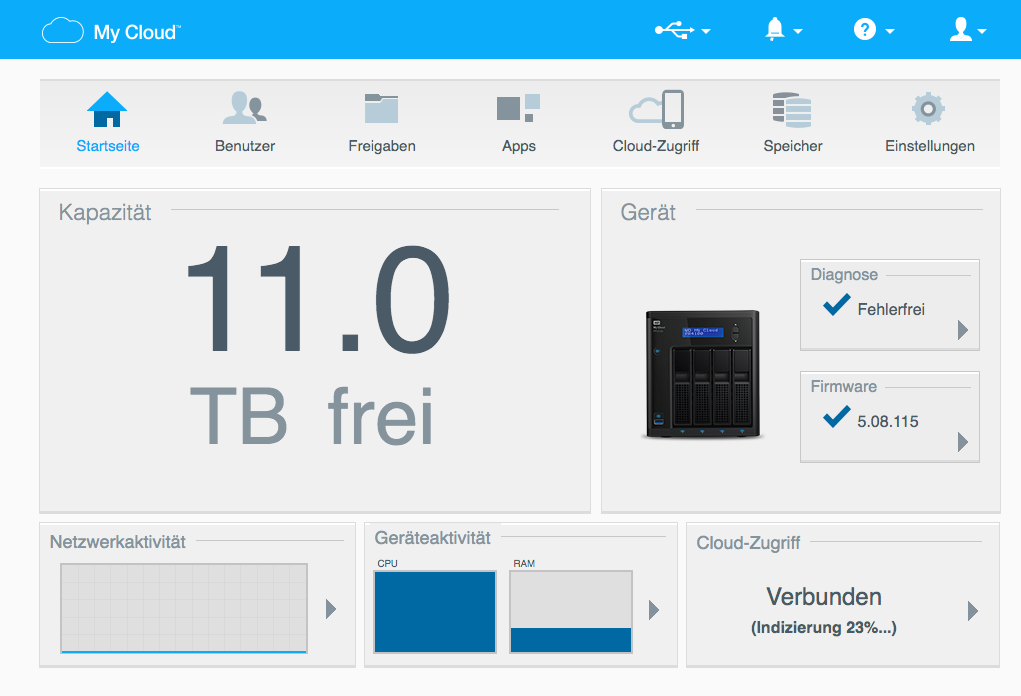
Loading bar and percentage progress are visible. One on the start screen and one in the could access window. The NAS can be used “normally” and I can switch it off and access my data normally, but sometimes it blocking or does not load. Especially for folders with a large file content (because the CPU is at 100%).
Started on December 23rd, 2020 / 7:00 pm → Status now on December 29th, 2020 / 9:30 pm → 78%
Theoretically, this results in:
78%: 146h = 0.53% per hour
24h 12.7% = (Real: 10% then 15% again, it fluctuates)
Temperature and volume:
So far everything is really ok. Temperature is between 49 ° and max. 55 °
You only hear the normal scratching as with normal copying, I don’t really see a big difference, sometimes it’s even very calmly.
Fan speed is 540 RPM, CPU is 24h at 100%
I uploaded several pictures, which show my settings and progress as well as workload.
Tips:
Since I have collected some tips from the forum that have really helped me, I want to pass them on in a bundle:
- Make sure to switch off the energy saving plan (also drive hibernation)
- Deactivate Time Machine
- Switch off mobile phone backup in the app (you may even want to delete it beforehand and save it somewhere else, depending on the mobile phone there are lots of small files and directory structures)
- Disable all Apps, especially Plex. That made a noticeable difference of a few percent per day for me. I even deleted all Apps, but according to other experience reports, it should also be possible to just deactivate them.
- Restrict access by programs or other people to the NAS as much as possible. Everything that eats up the CPU lengthens the process.
Problems I had/have:
- I have very large file directories or relatively deep directory structures with a wide variety of file formats, because I use my NAS as a photo and graphic backup. E.g. a pure film or photo NAS should go much faster.
- All folders are shared with me, so all of my used storage space is indexed
- Unfortunately, my Time Machine is also in these folders, since I also work outside of it and want to back up, I guess that also has a negative effect.
- At the beginning, the NAS went to sleep or even switched off completely. As soon as I had applied the tips, the NAS was working for 25 hours.
- I will keep you up to date when (and if?) I have reached 100%. Allegedly it can happen that OS5 thinks it has to do the whole process again, let’s see.
gr, Alex
(sry, for bad grammar, photos are also in german)
Photos: