WD Community

How to delete an entire abandoned backup folder, subfolders and files on WD MyCloud Mirror

I created a backup from one of my desktop folders onto my
new WD MyCloud Mirror using WD SmartWare Pro version 2.4.20.48.

= = = =

Yes, it works, and the originating folder, sub-folders and
files are now backed-up on WD MyCloud Mirror.
However, I would like to change the backup plan/schema.

= = = =

I want to do this by deleting the backed-up folders,
sub-folders and files on the WD MyCloud Mirror.

= = = =

Then, I plan to create a new backup plan/schema.

= = = =

No, I do not want to reformat the WD MyCloud Mirror 4TB system.

Yes, I’ve stopped the backup process.

No, I am NOT deleting the source / origination folders,
sub-folders, files, etc.

And, I do NOT wish to delete the source / origination
folders, sub-folders, files, etc.

= = = =

Yes, I searched the Knowledge Base, but find no solution.

How can I proceed to delete the backed-up folder, subfolders
and files on the MyCloud Mirror device?

Thanks
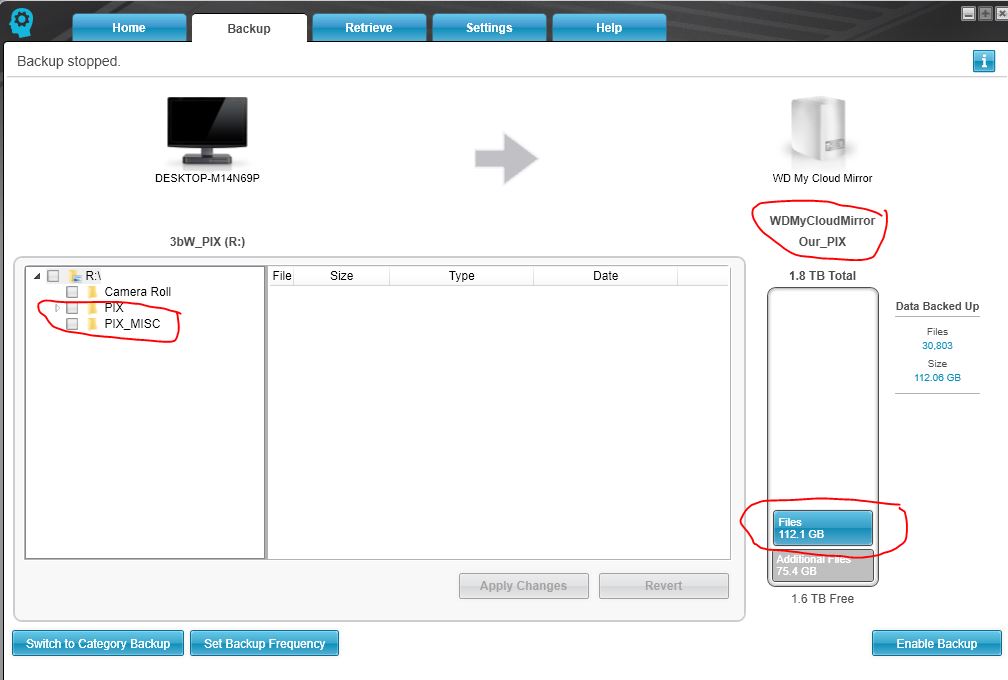
You can do it in two ways.

Either connect to the Smartware share and delete the relevant files/folders from your computer, or open the web dashboard, log in as admin and then using the web file viewer (under the apps tab) go to the smartware storage folder and delete the relevant backup that way.

Thank you…
Your note: “…open the web dashboard, log in as admin and then using the web file viewer (under the apps tab) go to the smartware storage folder and delete the relevant backup that way.” worked.
= = = =
Now I feel that I can safely try different options until I’m satisfied with my schema.
= = = =
Enjoy!!

Support for Western Digital Hard Drives | Western Digital

Still Need Help?

Reach out to Support for more assistance.

Sign in to Your Support Account

Get up-to-date information about your products.

Western Digital Business Portal

Unlock benefits and tools for your business such as enterprise support, pricing and rebate tools, marketing, loyalty, rewards, and more.

