I read an article on Arstechnica about how MSFT is forcing everyone into Microsoft accounts instead of local accounts for Win11. I used to use a MSFT account until WD borked this NAS. I have yet to upgrade to Win11 but if I did can I still use this NAS with a MSFT account? Or is it still possible to bypass an MSFT account?
@soaptrail
Have you looked at the WD web site and the device you want to purchase and checked to see what it is compatible with?
High-Performance SSDs, HDDs, USB Drives, & Memory Cards | Western Digital
User Manual English, My Cloud Home
4779-705163.pdf (SECURED) (wdc.com)
Knowledge Base search for, My Cloud Home and Windows 11.
Search Support | Western Digital
This is not a problem isolated to the MCH (My Cloud Home), it is true with most NAS use with Win11.
It is still possible to have a local account for Win11 (even PRO).
At the next screen, Microsoft touts all the benefits of using a Microsoft account. Click the Sign in button. Don’t worry, you’ll still be able to opt for a local account (Figure B).
Figure B

Click the Sign in button at the screen promoting a Microsoft account.
The next screen asks you to enter the email address for your Microsoft account. But instead of adding a legitimate address, you’re going to add a specific address for a locked dummy account designed to bypass this requirement. At the prompt, type the address: a@a.com. Click Next (Figure C).
Figure C
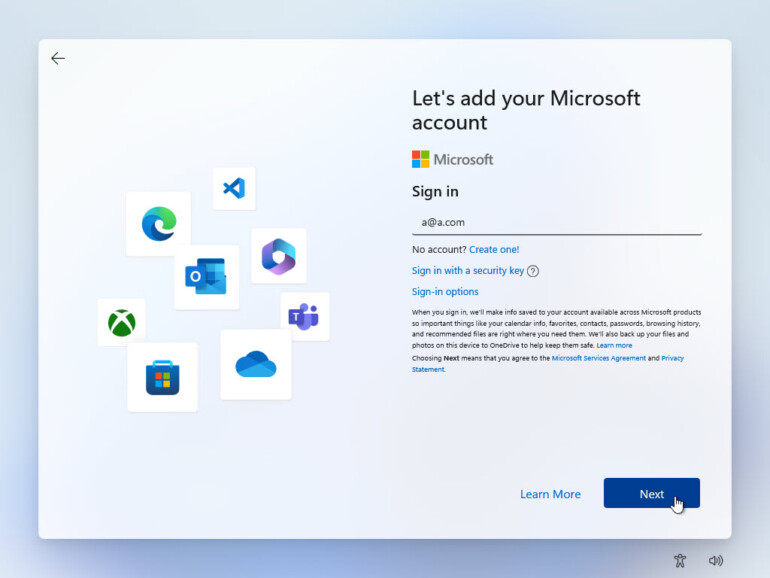
At the screen asking for a Microsoft account email address, type a@a.com.
The next screen prompts you to enter a password for the account. At this point, just type any random string of characters. Don’t worry; you won’t need to remember or use this password again. Click the Sign in button (Figure D).
Figure D

Type a random series of characters for the password.
After entering the bogus password, Windows displays an error message. No problem. That’s what should happen (Figure E). Click Next.
Figure E

Entering a random password triggers an error message.
Rather than fight you any further, Windows 11 finally lets you set up a local account. At the screen asking who’s going to use this device, type the name you wish to use for your local account (Figure F).
1 Like
Interesting so is the issue MSFT accounts are in Windows and external devices cannot get access to those accounts? I just assumed there was some basic credentials that could be passed to a NAS even if you use MSFT accounts.
Don’t know. MSFT tech support doesn’t seem to know either.
I spent 2 hours with MSFT tech support, ultimately we could not connect, and they suggested I try to ask here.
Bryan Hirsch
Feb 28, 2023, 5:20 PM
Hello,
I had the same issue. I ended up using Credential manager and in the control panel and added a new Windows Credential. Host is your NAS device then the username is NASHost then enter your password. This worked for me.
1 Like

