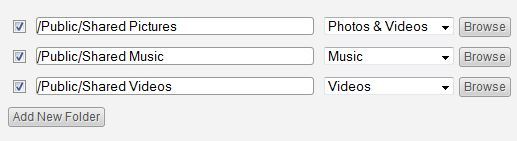
I noticed my MyCloud drive whirring away the other morning, which is odd, since I have set the Twonky Rescan Interval to one day (rather than the default -1 ‘scan continuously’ setting; I’d rather not wear my drive out pointlessly).
So I took a look at Twonk’ys settings. Hmmm… all reverted to the defaults, destroying my carefully crafted Ignore lists, Sharing folders, etc.
The cause? MyCloud had done an automatic upgrade, and this is such a dumb process that it trashes the entire /CacheVolume/twonkymedia directory and re-creates it with the default settings. Which is not exactly a seamless upgrade that your average consumer is looking for.
The obvious, and simple answer would be for the firmware upgrade script to save the twonkyserver.ini file somewhere before doing the firmware upgrade, then recreate the twonkymedia folder, restore the .ini file, and restart Twonky. I know the save/delete/mkdir/restore/restart routine works, because I’ve done that many times whilst sorting Twonky’s ‘space in the pathname’ problem with MyCloud’s ‘/Public/Shared Media’ folders. And it meant I had a backup .ini file I could restore via SSH login…
I’ll leave this as a suggestion for WD’s firmware developer. Unless someone fancies having a play with the MyCloud upgrade script; I’m rather worn out after fighting for hours with the pathname problem…
fromware? blast the spell checker…
Twonky’s ‘space in the pathname’ problem with MyCloud’s ‘/Public/Shared Media’ folders. And it meant I had a backup .ini file I could restore via SSH login…
Hi,
Could you enlighten me as to what you’ve done to solve the problem ?
It’s sound like what I’m suffering from.
This setting works and I can see my media

But this is what I want and it doesn’t work !!
Hi,
i think these Twonky ist working only with folder whitch is create on the UI… And no Sub-Folder allowed.
greeting
Lucky
gibbylinks wrote:
Twonky’s ‘space in the pathname’ problem with MyCloud’s ‘/Public/Shared Media’ folders. And it meant I had a backup .ini file I could restore via SSH login…
Hi,
Could you enlighten me as to what you’ve done to solve the problem ?
It’s sound like what I’m suffering from.
This setting works and I can see my media

But this is what I want and it doesn’t work !!
I got around this by renaming the share names from " /Public/Shared Pictures" to " /Public/Pictures" etc using the " WD My Cloud" windows app, and then resetting the shares in Twonky.
Although why call these folders by these names if they’re not going to work with the supplied software ?
Although why call these folders by these names if they’re not going to work with the supplied software ?
Indeed.
When I first set the MyCloud up, the default (enforced) folder names offended me in some undefinable way; why can’t I choose what to call folders on MY MyCloud? Why do I need that ‘Shared’ bit, when the root is /Public? Isn’t /Public a pretty obvious clue that its’s shared…?
And, as you did, I wanted Twonky to search my media folders only for the type of media they were identified to contain, so I used the Twonky UI to browse folders and set up the media searches. But it consistently broke Twonky.
Then I remembered that MyCloud is a Linux box, and Unix is well-known for not liking spaces in pathnames. So I did and experiment by creating a test directory with no spaces, and some media in it, and Twonky was quite happy. So I removed the 'Shared ’ from the folder names, modified the media sharing definitions via the Twonky UI, and did a re-scan. And, hoorah! The search worked, barring it sharing /Public/Videos as /Public/Shared Pictures, probably due to some persistent database setting from its previous scans.
I note that there are settings in the twonkyserver.ini file that cannot be set via the UI (uploaddir and servermanageddir). It may be that it’s these that are insisting on re-creating the ‘/Shared’ folders…
There are also some embedded hex strings (userid and twonkyinfo) that seem to encode some text settings, but I haven’t bottomed out which yet. friendlyname is certainly embedded. So it may be risky to modify twonkyserver.ini by hand, despite what is says in the file…
The other issue is that if you restart Twonky by stopping media sharing via the WD Dashboard, the Dashboard wipes your share folder settings when it restarts…