I have 2 brand new Elements 20 TB drives. On Crystaldiskinfo I have the RAW values set to 10 [DEC] and all of the values are the normal small numbers except for Spin-up Time, Helium Level and Temperature. Those values are large. Example, the temp is 41 degrees Celsius but the value shows 180390264873. These are the only two drives where I have this issue. Does anyone know why this is, and is there anything I can do about it?

Hi @mctalks
Have you opened a Support Case? If not opened, for more information, please contact the WD Technical Support team for the best assistance and troubleshooting:
Those numbers are best viewed in hexadecimal.
180390264873 = 0x2A00190029 → 0x2A / 0x0019 / 0x0029 → 42 / 25 / 41 (decimal)
https://www.google.com/search?q=180390264873+in+hex
There are three components which represent the maximum, minimum and current temperatures for the current power cycle.
I prefer to use 10 [DEC] because the numbers are 1-2, or perhaps 3 digits. I have a total of 12 drives and all of them show the normal 10 [DEC] readings ( ie if the temp is 38 degrees, the temperature column in the smart data in the list shows 38 ) except for these two 20TB drives. Both of them show the normal 1-2 digit readings in all columns except the three items I mentioned. I just want to know why that is, and if I can do anything to fix it.
Those numbers make no sense in decimal. I have the explained the reason to you in great detail. What more do you need?
YES! I KNOW they make no sense. Hence my question. Maybe this photo will help you understand my question. Look carefully at all of the Attributes for Spin up time, Helium Level and Temperature, why are they different than the rest? NONE of my other drives show this as you can see by the screenshot of my Elements 8TB version, and don’t bother saying it has something to do with the 8TB not being a helium drive because I have 4 other helium drives that don’t have this issue. If you don’t know why this is an issue with just these two drives, just say so.
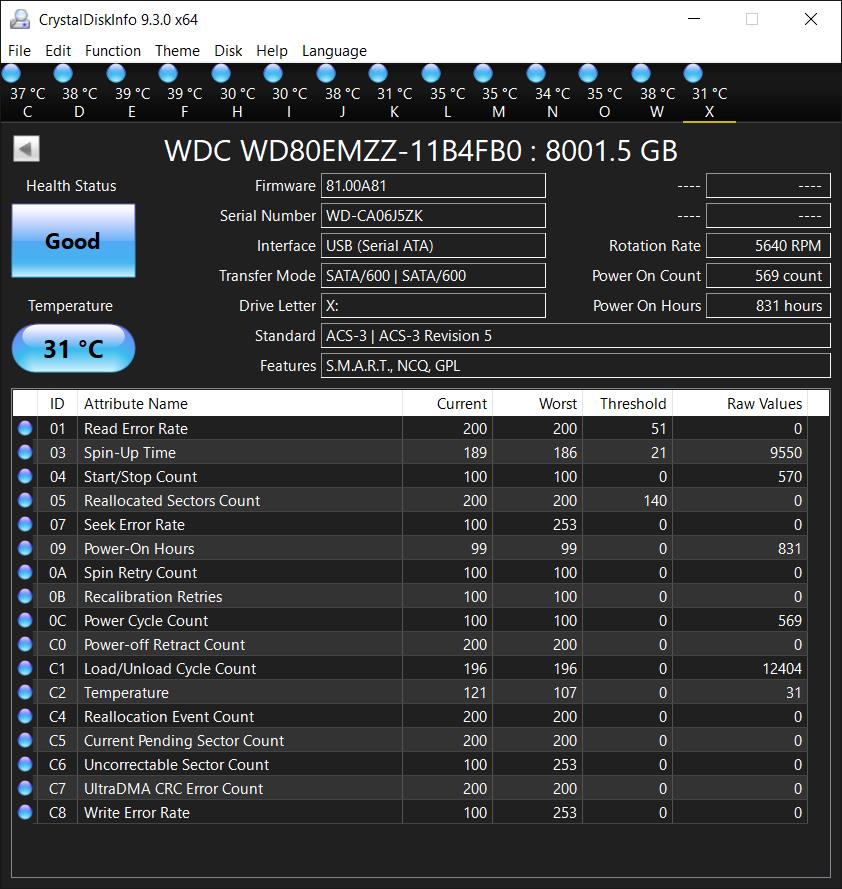
There is no standard for SMART attribute reporting, only a loose convention. The only people who know the real meaning and structure of the attribute data are the HDD manufacturers. Manufacturers will vary the SMART attributes between different models, and sometimes between different firmware versions for the same model.
The 8TB drive is a native WD model with WD firmware. The 20TB drive is a native HGST model with HGST firmware. Obviously, WD and HGST do things differently.
As for those large decimal numbers, once again I ask you to switch to hexadecimal mode. Heck, I’ll do it for you.
30064771308 = 0x7000000EC → 0x0007 / 0x0000 / 0x00EC = 7 / 0 / 236 (spin-up time)
https://www.google.com/search?q=0xec+in+decimal
6553700 = 0x640064 → 0x64 / 0x0064 = 100% / 100% (helium level)
141735559201 = 0x2100190021 → 0x21 / 0x0019 / 0x0021 = 33C / 25C / 33C (max/min/current temps)
281470681743360 = 0xFFFF00000000 (vendor specific attribute)
I wrote a tutorial here:
Why do SMART tools report attributes differently?
https://www.hddoracle.com/viewtopic.php?p=22249#p22249
Note that raw values are often best viewed in hexadecimal format. This is because they sometimes consist of multiple parts. For example, the raw value for a single temperature attribute will often contain the current, maximum and minimum temperatures for the current power cycle. In CrystalDiskInfo one can see this by selecting Function → Advanced Feature → Raw Values → 10[DEC] - 2byte or 10[DEC] - 1byte.

