WD Community

How to acces shared folder locally

Hi, I can acces my personal storage trough Windows File Explorer, but I don’t know how to do the same with a shared folder given to me by another user on the same device.

I remember some time ago i was able to acces to a saherd folder but I can’t rememer how I did it.

Tahnk you

1 Like

Have you already checked the User Manual?

1 Like

Yes, but it doesn’t say a thing about local acces

In File Explorer, click on Network. If the folder was shared by another user on the same device, it’s likely under ‘This PC.’ You should see folders and files here. If prompted, provide the credentials

If you can’t access the folder, ensure the user who shared it has permitted you.
Right-click the folder, then select Properties > Sharing tab > Share or Advanced Sharing.
Add your user account or “Everyone” to the share permissions and set read/write access as needed.

Hi! Thanks for your response.

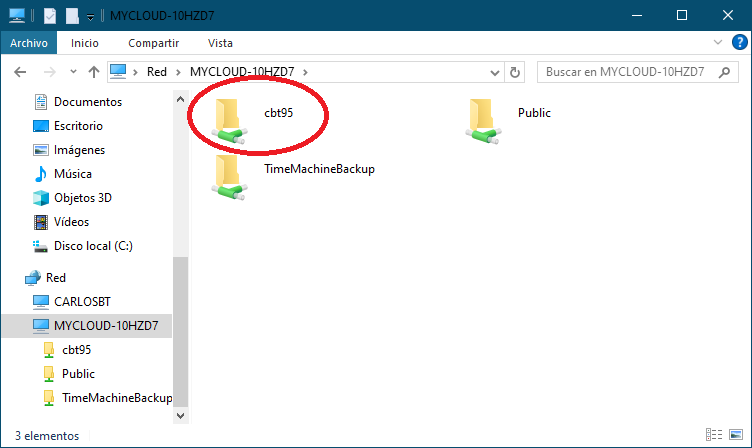
In File Explorer only appears my own storage (highlighted in red):

The thing I want is a folder my dad shared with me appears in File Explorer too. Specifically that one:

Thanks for reading

Are those your “home” folders?

How exactly did he “share” it with you?

yes, the folder “cbt95” contains my cloud.

In the second picture y show the folder my dad shared me. He shared trough de app, like this (clicking in the three dots first)

Hey, the folder your dad shared through the My Cloud Home app won’t show up in File Explorer. That kind of share only works through the web or the WD Discovery app, not over the local network. If you want it to show up like your own folder, you’d need a different setup—like a public share or a regular My Cloud device instead of My Cloud Home.
Are you sure?

I seem to remember I once had a shared folder in File Explorer.

Support for Western Digital Hard Drives | Western Digital

Still Need Help?

Reach out to Support for more assistance.

Sign in to Your Support Account

Get up-to-date information about your products.

Western Digital Business Portal

Unlock benefits and tools for your business such as enterprise support, pricing and rebate tools, marketing, loyalty, rewards, and more.

